Compare commits
16
Commits
| Author | SHA1 | Date | |
|---|---|---|---|
 Alexey Grigorev Alexey Grigorev
|
744316473e | ||
 ellacharmed ellacharmed
|
6c045a2fa7 | ||
 Alexey Grigorev Alexey Grigorev
|
ef377950c0 | ||
|
Alexey Grigorev
|
2990b7f14e | ||
|
Alexey Grigorev
|
44fc08d7db | ||
 Noel Kwan Noel Kwan
|
7caa2ff237 | ||
 Marɨa Fɨsher Marɨa Fɨsher
|
5801672ec8 | ||
|
Alexey Grigorev
|
4877ceb245 | ||
|
Alexey Grigorev
|
77340b1d79 | ||
|
Noel Kwan
|
177b1a8c18 | ||
 Anju Mohan Anju Mohan
|
5b71053758 | ||
 mhmed rjb mhmed rjb
|
9f8d5d12fe | ||
 Alex Alex
|
ae86a2001d | ||
|
Noel Kwan
|
9d62b2cc61 | ||
 Victoria Perez Mola Victoria Perez Mola
|
ab39fc3bcc | ||
|
Victoria Perez Mola
|
5873a63ce9 |
@@ -25,6 +25,13 @@ And follow [this](setup/pyspark.md) to run PySpark in Jupyter
|
||||
|
||||
[](https://youtu.be/hqUbB9c8sKg&list=PL3MmuxUbc_hJed7dXYoJw8DoCuVHhGEQb&index=53)
|
||||
|
||||
Alternatively, if the setups above don't work, you can run Spark in Google Colab.
|
||||
> [!NOTE]
|
||||
> It's advisable to invest some time in setting things up locally rather than immediately jumping into this solution
|
||||
|
||||
* [Google Colab Instructions](https://medium.com/gitconnected/launch-spark-on-google-colab-and-connect-to-sparkui-342cad19b304)
|
||||
* [Google Colab Starter Notebook](https://github.com/aaalexlit/medium_articles/blob/main/Spark_in_Colab.ipynb)
|
||||
|
||||
|
||||
## 5.3 Spark SQL and DataFrames
|
||||
|
||||
@@ -111,4 +118,5 @@ Did you take notes? You can share them here.
|
||||
* [Notes by Victor Padilha](https://github.com/padilha/de-zoomcamp/tree/master/week5)
|
||||
* [Notes by Oscar Garcia](https://github.com/ozkary/Data-Engineering-Bootcamp/tree/main/Step5-Batch-Processing)
|
||||
* [Notes by HongWei](https://github.com/hwchua0209/data-engineering-zoomcamp-submission/blob/main/05-batch-processing/README.md)
|
||||
* [2024 videos transcript](https://drive.google.com/drive/folders/1XMmP4H5AMm1qCfMFxc_hqaPGw31KIVcb?usp=drive_link) by Maria Fisher
|
||||
* Add your notes here (above this line)
|
||||
|
||||
@@ -65,7 +65,17 @@
|
||||
}
|
||||
],
|
||||
"source": [
|
||||
"!wget https://nyc-tlc.s3.amazonaws.com/trip+data/fhvhv_tripdata_2021-01.csv"
|
||||
"!wget https://github.com/DataTalksClub/nyc-tlc-data/releases/download/fhvhv/fhvhv_tripdata_2021-01.csv.gz"
|
||||
]
|
||||
},
|
||||
{
|
||||
"cell_type": "code",
|
||||
"execution_count": null,
|
||||
"id": "201a5957",
|
||||
"metadata": {},
|
||||
"outputs": [],
|
||||
"source": [
|
||||
"!gzip -dc fhvhv_tripdata_2021-01.csv.gz"
|
||||
]
|
||||
},
|
||||
{
|
||||
@@ -501,25 +511,25 @@
|
||||
"name": "stdout",
|
||||
"output_type": "stream",
|
||||
"text": [
|
||||
"hvfhs_license_num,dispatching_base_num,pickup_datetime,dropoff_datetime,PULocationID,DOLocationID,SR_Flag\r",
|
||||
"hvfhs_license_num,dispatching_base_num,pickup_datetime,dropoff_datetime,PULocationID,DOLocationID,SR_Flag\r\n",
|
||||
"\r\n",
|
||||
"HV0003,B02682,2021-01-01 00:33:44,2021-01-01 00:49:07,230,166,\r",
|
||||
"HV0003,B02682,2021-01-01 00:33:44,2021-01-01 00:49:07,230,166,\r\n",
|
||||
"\r\n",
|
||||
"HV0003,B02682,2021-01-01 00:55:19,2021-01-01 01:18:21,152,167,\r",
|
||||
"HV0003,B02682,2021-01-01 00:55:19,2021-01-01 01:18:21,152,167,\r\n",
|
||||
"\r\n",
|
||||
"HV0003,B02764,2021-01-01 00:23:56,2021-01-01 00:38:05,233,142,\r",
|
||||
"HV0003,B02764,2021-01-01 00:23:56,2021-01-01 00:38:05,233,142,\r\n",
|
||||
"\r\n",
|
||||
"HV0003,B02764,2021-01-01 00:42:51,2021-01-01 00:45:50,142,143,\r",
|
||||
"HV0003,B02764,2021-01-01 00:42:51,2021-01-01 00:45:50,142,143,\r\n",
|
||||
"\r\n",
|
||||
"HV0003,B02764,2021-01-01 00:48:14,2021-01-01 01:08:42,143,78,\r",
|
||||
"HV0003,B02764,2021-01-01 00:48:14,2021-01-01 01:08:42,143,78,\r\n",
|
||||
"\r\n",
|
||||
"HV0005,B02510,2021-01-01 00:06:59,2021-01-01 00:43:01,88,42,\r",
|
||||
"HV0005,B02510,2021-01-01 00:06:59,2021-01-01 00:43:01,88,42,\r\n",
|
||||
"\r\n",
|
||||
"HV0005,B02510,2021-01-01 00:50:00,2021-01-01 01:04:57,42,151,\r",
|
||||
"HV0005,B02510,2021-01-01 00:50:00,2021-01-01 01:04:57,42,151,\r\n",
|
||||
"\r\n",
|
||||
"HV0003,B02764,2021-01-01 00:14:30,2021-01-01 00:50:27,71,226,\r",
|
||||
"HV0003,B02764,2021-01-01 00:14:30,2021-01-01 00:50:27,71,226,\r\n",
|
||||
"\r\n",
|
||||
"HV0003,B02875,2021-01-01 00:22:54,2021-01-01 00:30:20,112,255,\r",
|
||||
"HV0003,B02875,2021-01-01 00:22:54,2021-01-01 00:30:20,112,255,\r\n",
|
||||
"\r\n"
|
||||
]
|
||||
}
|
||||
|
||||
@@ -24,6 +24,31 @@ export PATH="$JAVA_HOME/bin/:$PATH"
|
||||
|
||||
Make sure Java was installed to `/usr/local/Cellar/openjdk@11/11.0.12`: Open Finder > Press Cmd+Shift+G > paste "/usr/local/Cellar/openjdk@11/11.0.12". If you can't find it, then change the path location to appropriate path on your machine. You can also run `brew info java` to check where java was installed on your machine.
|
||||
|
||||
### Anaconda-based spark set up
|
||||
if you are having anaconda setup, you can skip the spark installation and instead Pyspark package to run the spark.
|
||||
With Anaconda and Mac we can spark set by first installing pyspark and then for environment variable set up findspark
|
||||
|
||||
Open Anaconda Activate the environment where you want to apply these changes
|
||||
|
||||
Run pyspark and install it as a package in this environment <br>
|
||||
Run findspark and install it as a package in this environment
|
||||
|
||||
Ensure that open JDK is already set up. This allows us to not have to install Spark separately and manually set up the environment Also with this we may have to use Jupyter Lab (instead of Jupyter Notebook) to open a Jupyter notebook for running the programs.
|
||||
Once the Spark is set up start the conda environment and open Jupyter Lab.
|
||||
Run the program below in notebook to check everything is running fine.
|
||||
```
|
||||
import pyspark
|
||||
from pyspark.sql import SparkSession
|
||||
|
||||
!spark-shell --version
|
||||
|
||||
# Create SparkSession
|
||||
spark = SparkSession.builder.master("local[1]") \
|
||||
.appName('test-spark') \
|
||||
.getOrCreate()
|
||||
|
||||
print(f'The PySpark {spark.version} version is running...')
|
||||
```
|
||||
### Installing Spark
|
||||
|
||||
1. Install Scala
|
||||
@@ -64,3 +89,4 @@ distData.filter(_ < 10).collect()
|
||||
It's the same for all platforms. Go to [pyspark.md](pyspark.md).
|
||||
|
||||
|
||||
|
||||
|
||||
@@ -82,11 +82,11 @@ Please follow the steps described under [pyspark-streaming](python/streams-examp
|
||||
|
||||
- :movie_camera: 6.13 Kafka Streaming with Python
|
||||
|
||||
[](https://youtu.be/Y76Ez_fIvtk&list=PL3MmuxUbc_hJed7dXYoJw8DoCuVHhGEQb&index=79)
|
||||
[](https://youtu.be/BgAlVknDFlQ&list=PL3MmuxUbc_hJed7dXYoJw8DoCuVHhGEQb&index=79)
|
||||
|
||||
- :movie_camera: 6.14 Pyspark Structured Streaming
|
||||
|
||||
[](https://youtu.be/5hRJ8-6Fpyk&list=PL3MmuxUbc_hJed7dXYoJw8DoCuVHhGEQb&index=80)
|
||||
[](https://youtu.be/VIVr7KwRQmE&list=PL3MmuxUbc_hJed7dXYoJw8DoCuVHhGEQb&index=80)
|
||||
|
||||
## Kafka Streams with JVM library
|
||||
|
||||
|
||||
@@ -0,0 +1,108 @@
|
||||
# Basic PubSub example with Redpanda
|
||||
|
||||
The aim of this module is to have a good grasp on the foundation of these Kafka/Redpanda concepts, to be able to submit a capstone project using streaming:
|
||||
- clusters
|
||||
- brokers
|
||||
- topics
|
||||
- producers
|
||||
- consumers and consumer groups
|
||||
- data serialization and deserialization
|
||||
- replication and retention
|
||||
- offsets
|
||||
- consumer-groups
|
||||
-
|
||||
|
||||
## 1. Pre-requisites
|
||||
|
||||
If you have been following the [module-06](./../../../06-streaming/README.md) videos, you might already have installed the `kafka-python` library, so you can move on to [Docker](#2-docker) section.
|
||||
|
||||
If you have not, this is the only package you need to install in your virtual environment for this Redpanda lesson.
|
||||
|
||||
1. activate your environment
|
||||
2. `pip install kafka-python`
|
||||
|
||||
## 2. Docker
|
||||
|
||||
Start a Redpanda cluster. Redpanda is a single binary image, so it is very easy to start learning kafka concepts with Redpanda.
|
||||
|
||||
```bash
|
||||
cd 06-streaming/python/redpanda_example/
|
||||
docker-compose up -d
|
||||
```
|
||||
|
||||
## 3. Set RPK alias
|
||||
|
||||
Redpanda has a console command `rpk` which means `Redpanda keeper`, the CLI tool that ships with Redpanda and is already available in the Docker image.
|
||||
|
||||
Set the following `rpk` alias so we can use it from our terminal, without having to open a Docker interactive terminal. We can use this `rpk` alias directly in our terminal.
|
||||
|
||||
```bash
|
||||
alias rpk="docker exec -ti redpanda-1 rpk"
|
||||
rpk version
|
||||
```
|
||||
|
||||
At this time, the verion is shown as `v23.2.26 (rev 328d83a06e)`. The important version munber is the major one `v23` following the versioning semantics `major.minor[.build[.revision]]`, to ensure that you get the same results as whatever is shared in this document.
|
||||
|
||||
> [!TIP]
|
||||
> If you're reading this after Mar, 2024 and want to update the Docker file to use the latest Redpanda images, just visit [Docker hub](https://hub.docker.com/r/vectorized/redpanda/tags), and paste the new version number.
|
||||
|
||||
|
||||
## 4. Kafka Producer - Consumer Examples
|
||||
|
||||
To run the producer-consumer examples, open 2 shell terminals in 2 side-by-side tabs and run following commands. Be sure to activate your virtual environment in each terminal.
|
||||
|
||||
```bash
|
||||
# Start consumer script, in 1st terminal tab
|
||||
python -m consumer.py
|
||||
# Start producer script, in 2nd terminal tab
|
||||
python -m producer.py
|
||||
```
|
||||
|
||||
Run the `python -m producer.py` command again (and again) to observe that the `consumer` worker tab would automatically consume messages in real-time when new `events` occur
|
||||
|
||||
## 5. Redpanda UI
|
||||
|
||||
You can also see the clusters, topics, etc from the Redpanda Console UI via your browser at [http://localhost:8080](http://localhost:8080)
|
||||
|
||||
|
||||
## 6. rpk commands glossary
|
||||
|
||||
Visit [get-started-rpk blog post](https://redpanda.com/blog/get-started-rpk-manage-streaming-data-clusters) for more.
|
||||
|
||||
```bash
|
||||
# set alias for rpk
|
||||
alias rpk="docker exec -ti redpanda-1 rpk"
|
||||
|
||||
# get info on cluster
|
||||
rpk cluster info
|
||||
|
||||
# create topic_name with m partitions and n replication factor
|
||||
rpk topic create [topic_name] --partitions m --replicas n
|
||||
|
||||
# get list of available topics, without extra details and with details
|
||||
rpk topic list
|
||||
rpk topic list --detailed
|
||||
|
||||
# inspect topic config
|
||||
rpk topic describe [topic_name]
|
||||
|
||||
# consume [topic_name]
|
||||
rpk topic consume [topic_name]
|
||||
|
||||
# list the consumer groups in a Redpanda cluster
|
||||
rpk group list
|
||||
|
||||
# get additional information about a consumer group, from above listed result
|
||||
rpk group describe my-group
|
||||
```
|
||||
|
||||
## 7. Additional Resources
|
||||
|
||||
Redpanda Univerity (needs a Redpanda account and it is free to enrol and do the course(s))
|
||||
- [RP101: Getting Started with Redpanda](https://university.redpanda.com/courses/hands-on-redpanda-getting-started)
|
||||
- [RP102: Stream Processing with Redpanda](https://university.redpanda.com/courses/take/hands-on-redpanda-stream-processing/lessons/37830192-intro)
|
||||
- [SF101: Streaming Fundamentals](https://university.redpanda.com/courses/streaming-fundamentals)
|
||||
- [SF102: Kafka building blocks](https://university.redpanda.com/courses/kafka-building-blocks)
|
||||
|
||||
If you feel that you already have a good foundational basis on Streaming and Kafka, feel free to skip these supplementary courses.
|
||||
|
||||
@@ -0,0 +1,48 @@
|
||||
import os
|
||||
from typing import Dict, List
|
||||
from json import loads
|
||||
from kafka import KafkaConsumer
|
||||
|
||||
from ride import Ride
|
||||
from settings import BOOTSTRAP_SERVERS, KAFKA_TOPIC
|
||||
|
||||
|
||||
class JsonConsumer:
|
||||
def __init__(self, props: Dict):
|
||||
self.consumer = KafkaConsumer(**props)
|
||||
|
||||
def consume_from_kafka(self, topics: List[str]):
|
||||
self.consumer.subscribe(topics)
|
||||
print('Consuming from Kafka started')
|
||||
print('Available topics to consume: ', self.consumer.subscription())
|
||||
while True:
|
||||
try:
|
||||
# SIGINT can't be handled when polling, limit timeout to 1 second.
|
||||
message = self.consumer.poll(1.0)
|
||||
if message is None or message == {}:
|
||||
continue
|
||||
for message_key, message_value in message.items():
|
||||
for msg_val in message_value:
|
||||
print(msg_val.key, msg_val.value)
|
||||
except KeyboardInterrupt:
|
||||
break
|
||||
|
||||
self.consumer.close()
|
||||
|
||||
|
||||
if __name__ == '__main__':
|
||||
config = {
|
||||
'bootstrap_servers': BOOTSTRAP_SERVERS,
|
||||
'auto_offset_reset': 'earliest',
|
||||
'enable_auto_commit': True,
|
||||
'key_deserializer': lambda key: int(key.decode('utf-8')),
|
||||
'value_deserializer': lambda x: loads(x.decode('utf-8'), object_hook=lambda d: Ride.from_dict(d)),
|
||||
'group_id': 'consumer.group.id.json-example.1',
|
||||
}
|
||||
|
||||
json_consumer = JsonConsumer(props=config)
|
||||
json_consumer.consume_from_kafka(topics=[KAFKA_TOPIC])
|
||||
|
||||
|
||||
# There's no schema in JSON format, so if the schema changes and one column is removed or new one added or the data types is changed, the Ride class would still work and produce-consume messages would still run without a hitch.
|
||||
# But the issue is in the downstream Analytics as the dataset would no longer have that column and the dashboards would thus fail. Therefore, the trust in our data and processes would erodes.
|
||||
@@ -0,0 +1,90 @@
|
||||
version: '3.7'
|
||||
services:
|
||||
# Redpanda cluster
|
||||
redpanda-1:
|
||||
image: docker.redpanda.com/redpandadata/redpanda:v23.2.26
|
||||
container_name: redpanda-1
|
||||
command:
|
||||
- redpanda
|
||||
- start
|
||||
- --smp
|
||||
- '1'
|
||||
- --reserve-memory
|
||||
- 0M
|
||||
- --overprovisioned
|
||||
- --node-id
|
||||
- '1'
|
||||
- --kafka-addr
|
||||
- PLAINTEXT://0.0.0.0:29092,OUTSIDE://0.0.0.0:9092
|
||||
- --advertise-kafka-addr
|
||||
- PLAINTEXT://redpanda-1:29092,OUTSIDE://localhost:9092
|
||||
- --pandaproxy-addr
|
||||
- PLAINTEXT://0.0.0.0:28082,OUTSIDE://0.0.0.0:8082
|
||||
- --advertise-pandaproxy-addr
|
||||
- PLAINTEXT://redpanda-1:28082,OUTSIDE://localhost:8082
|
||||
- --rpc-addr
|
||||
- 0.0.0.0:33145
|
||||
- --advertise-rpc-addr
|
||||
- redpanda-1:33145
|
||||
ports:
|
||||
# - 8081:8081
|
||||
- 8082:8082
|
||||
- 9092:9092
|
||||
- 9644:9644
|
||||
- 28082:28082
|
||||
- 29092:29092
|
||||
|
||||
# Want a two node Redpanda cluster? Uncomment this block :)
|
||||
# redpanda-2:
|
||||
# image: docker.redpanda.com/redpandadata/redpanda:v23.1.1
|
||||
# container_name: redpanda-2
|
||||
# command:
|
||||
# - redpanda
|
||||
# - start
|
||||
# - --smp
|
||||
# - '1'
|
||||
# - --reserve-memory
|
||||
# - 0M
|
||||
# - --overprovisioned
|
||||
# - --node-id
|
||||
# - '2'
|
||||
# - --seeds
|
||||
# - redpanda-1:33145
|
||||
# - --kafka-addr
|
||||
# - PLAINTEXT://0.0.0.0:29093,OUTSIDE://0.0.0.0:9093
|
||||
# - --advertise-kafka-addr
|
||||
# - PLAINTEXT://redpanda-2:29093,OUTSIDE://localhost:9093
|
||||
# - --pandaproxy-addr
|
||||
# - PLAINTEXT://0.0.0.0:28083,OUTSIDE://0.0.0.0:8083
|
||||
# - --advertise-pandaproxy-addr
|
||||
# - PLAINTEXT://redpanda-2:28083,OUTSIDE://localhost:8083
|
||||
# - --rpc-addr
|
||||
# - 0.0.0.0:33146
|
||||
# - --advertise-rpc-addr
|
||||
# - redpanda-2:33146
|
||||
# ports:
|
||||
# - 8083:8083
|
||||
# - 9093:9093
|
||||
|
||||
redpanda-console:
|
||||
image: docker.redpanda.com/redpandadata/console:v2.2.2
|
||||
container_name: redpanda-console
|
||||
entrypoint: /bin/sh
|
||||
command: -c "echo \"$$CONSOLE_CONFIG_FILE\" > /tmp/config.yml; /app/console"
|
||||
environment:
|
||||
CONFIG_FILEPATH: /tmp/config.yml
|
||||
CONSOLE_CONFIG_FILE: |
|
||||
kafka:
|
||||
brokers: ["redpanda-1:29092"]
|
||||
schemaRegistry:
|
||||
enabled: false
|
||||
redpanda:
|
||||
adminApi:
|
||||
enabled: true
|
||||
urls: ["http://redpanda-1:9644"]
|
||||
connect:
|
||||
enabled: false
|
||||
ports:
|
||||
- 8080:8080
|
||||
depends_on:
|
||||
- redpanda-1
|
||||
@@ -0,0 +1,44 @@
|
||||
import csv
|
||||
import json
|
||||
from typing import List, Dict
|
||||
from kafka import KafkaProducer
|
||||
from kafka.errors import KafkaTimeoutError
|
||||
|
||||
from ride import Ride
|
||||
from settings import BOOTSTRAP_SERVERS, INPUT_DATA_PATH, KAFKA_TOPIC
|
||||
|
||||
|
||||
class JsonProducer(KafkaProducer):
|
||||
def __init__(self, props: Dict):
|
||||
self.producer = KafkaProducer(**props)
|
||||
|
||||
@staticmethod
|
||||
def read_records(resource_path: str):
|
||||
records = []
|
||||
with open(resource_path, 'r') as f:
|
||||
reader = csv.reader(f)
|
||||
header = next(reader) # skip the header row
|
||||
for row in reader:
|
||||
records.append(Ride(arr=row))
|
||||
return records
|
||||
|
||||
def publish_rides(self, topic: str, messages: List[Ride]):
|
||||
for ride in messages:
|
||||
try:
|
||||
record = self.producer.send(topic=topic, key=ride.pu_location_id, value=ride)
|
||||
print('Record {} successfully produced at offset {}'.format(ride.pu_location_id, record.get().offset))
|
||||
except KafkaTimeoutError as e:
|
||||
print(e.__str__())
|
||||
|
||||
|
||||
if __name__ == '__main__':
|
||||
# Config Should match with the KafkaProducer expectation
|
||||
# kafka expects binary format for the key-value pair
|
||||
config = {
|
||||
'bootstrap_servers': BOOTSTRAP_SERVERS,
|
||||
'key_serializer': lambda key: str(key).encode(),
|
||||
'value_serializer': lambda x: json.dumps(x.__dict__, default=str).encode('utf-8')
|
||||
}
|
||||
producer = JsonProducer(props=config)
|
||||
rides = producer.read_records(resource_path=INPUT_DATA_PATH)
|
||||
producer.publish_rides(topic=KAFKA_TOPIC, messages=rides)
|
||||
@@ -0,0 +1,52 @@
|
||||
from typing import List, Dict
|
||||
from decimal import Decimal
|
||||
from datetime import datetime
|
||||
|
||||
|
||||
class Ride:
|
||||
def __init__(self, arr: List[str]):
|
||||
self.vendor_id = arr[0]
|
||||
self.tpep_pickup_datetime = datetime.strptime(arr[1], "%Y-%m-%d %H:%M:%S"),
|
||||
self.tpep_dropoff_datetime = datetime.strptime(arr[2], "%Y-%m-%d %H:%M:%S"),
|
||||
self.passenger_count = int(arr[3])
|
||||
self.trip_distance = Decimal(arr[4])
|
||||
self.rate_code_id = int(arr[5])
|
||||
self.store_and_fwd_flag = arr[6]
|
||||
self.pu_location_id = int(arr[7])
|
||||
self.do_location_id = int(arr[8])
|
||||
self.payment_type = arr[9]
|
||||
self.fare_amount = Decimal(arr[10])
|
||||
self.extra = Decimal(arr[11])
|
||||
self.mta_tax = Decimal(arr[12])
|
||||
self.tip_amount = Decimal(arr[13])
|
||||
self.tolls_amount = Decimal(arr[14])
|
||||
self.improvement_surcharge = Decimal(arr[15])
|
||||
self.total_amount = Decimal(arr[16])
|
||||
self.congestion_surcharge = Decimal(arr[17])
|
||||
|
||||
@classmethod
|
||||
def from_dict(cls, d: Dict):
|
||||
return cls(arr=[
|
||||
d['vendor_id'],
|
||||
d['tpep_pickup_datetime'][0],
|
||||
d['tpep_dropoff_datetime'][0],
|
||||
d['passenger_count'],
|
||||
d['trip_distance'],
|
||||
d['rate_code_id'],
|
||||
d['store_and_fwd_flag'],
|
||||
d['pu_location_id'],
|
||||
d['do_location_id'],
|
||||
d['payment_type'],
|
||||
d['fare_amount'],
|
||||
d['extra'],
|
||||
d['mta_tax'],
|
||||
d['tip_amount'],
|
||||
d['tolls_amount'],
|
||||
d['improvement_surcharge'],
|
||||
d['total_amount'],
|
||||
d['congestion_surcharge'],
|
||||
]
|
||||
)
|
||||
|
||||
def __repr__(self):
|
||||
return f'{self.__class__.__name__}: {self.__dict__}'
|
||||
@@ -0,0 +1,4 @@
|
||||
INPUT_DATA_PATH = '../resources/rides.csv'
|
||||
|
||||
BOOTSTRAP_SERVERS = ['localhost:9092']
|
||||
KAFKA_TOPIC = 'rides_json'
|
||||
@@ -0,0 +1,46 @@
|
||||
|
||||
# Running PySpark Streaming with Redpanda
|
||||
|
||||
### 1. Prerequisite
|
||||
|
||||
It is important to create network and volume as described in the document. Therefore please ensure, your volume and network are created correctly.
|
||||
|
||||
```bash
|
||||
docker volume ls # should list hadoop-distributed-file-system
|
||||
docker network ls # should list kafka-spark-network
|
||||
```
|
||||
|
||||
### 2. Create Docker Network & Volume
|
||||
|
||||
If you have not followed any other examples, and above `ls` steps shows no output, create them now.
|
||||
|
||||
```bash
|
||||
# Create Network
|
||||
docker network create kafka-spark-network
|
||||
|
||||
# Create Volume
|
||||
docker volume create --name=hadoop-distributed-file-system
|
||||
```
|
||||
|
||||
### Running Producer and Consumer
|
||||
```bash
|
||||
# Run producer
|
||||
python producer.py
|
||||
|
||||
# Run consumer with default settings
|
||||
python consumer.py
|
||||
# Run consumer for specific topic
|
||||
python consumer.py --topic <topic-name>
|
||||
```
|
||||
|
||||
### Running Streaming Script
|
||||
|
||||
spark-submit script ensures installation of necessary jars before running the streaming.py
|
||||
|
||||
```bash
|
||||
./spark-submit.sh streaming.py
|
||||
```
|
||||
|
||||
### Additional Resources
|
||||
- [Structured Streaming Programming Guide](https://spark.apache.org/docs/latest/structured-streaming-programming-guide.html#structured-streaming-programming-guide)
|
||||
- [Structured Streaming + Kafka Integration](https://spark.apache.org/docs/latest/structured-streaming-kafka-integration.html#structured-streaming-kafka-integration-guide-kafka-broker-versio)
|
||||
@@ -0,0 +1,47 @@
|
||||
import argparse
|
||||
from typing import Dict, List
|
||||
from kafka import KafkaConsumer
|
||||
|
||||
from settings import BOOTSTRAP_SERVERS, CONSUME_TOPIC_RIDES_CSV
|
||||
|
||||
|
||||
class RideCSVConsumer:
|
||||
def __init__(self, props: Dict):
|
||||
self.consumer = KafkaConsumer(**props)
|
||||
|
||||
def consume_from_kafka(self, topics: List[str]):
|
||||
self.consumer.subscribe(topics=topics)
|
||||
print('Consuming from Kafka started')
|
||||
print('Available topics to consume: ', self.consumer.subscription())
|
||||
while True:
|
||||
try:
|
||||
# SIGINT can't be handled when polling, limit timeout to 1 second.
|
||||
msg = self.consumer.poll(1.0)
|
||||
if msg is None or msg == {}:
|
||||
continue
|
||||
for msg_key, msg_values in msg.items():
|
||||
for msg_val in msg_values:
|
||||
print(f'Key:{msg_val.key}-type({type(msg_val.key)}), '
|
||||
f'Value:{msg_val.value}-type({type(msg_val.value)})')
|
||||
except KeyboardInterrupt:
|
||||
break
|
||||
|
||||
self.consumer.close()
|
||||
|
||||
|
||||
if __name__ == '__main__':
|
||||
parser = argparse.ArgumentParser(description='Kafka Consumer')
|
||||
parser.add_argument('--topic', type=str, default=CONSUME_TOPIC_RIDES_CSV)
|
||||
args = parser.parse_args()
|
||||
|
||||
topic = args.topic
|
||||
config = {
|
||||
'bootstrap_servers': [BOOTSTRAP_SERVERS],
|
||||
'auto_offset_reset': 'earliest',
|
||||
'enable_auto_commit': True,
|
||||
'key_deserializer': lambda key: int(key.decode('utf-8')),
|
||||
'value_deserializer': lambda value: value.decode('utf-8'),
|
||||
'group_id': 'consumer.group.id.csv-example.1',
|
||||
}
|
||||
csv_consumer = RideCSVConsumer(props=config)
|
||||
csv_consumer.consume_from_kafka(topics=[topic])
|
||||
@@ -0,0 +1,104 @@
|
||||
version: '3.7'
|
||||
volumes:
|
||||
shared-workspace:
|
||||
name: "hadoop-distributed-file-system"
|
||||
driver: local
|
||||
networks:
|
||||
default:
|
||||
name: kafka-spark-network
|
||||
external: true
|
||||
services:
|
||||
# Redpanda cluster
|
||||
redpanda-1:
|
||||
image: docker.redpanda.com/redpandadata/redpanda:v23.2.26
|
||||
container_name: redpanda-1
|
||||
command:
|
||||
- redpanda
|
||||
- start
|
||||
- --smp
|
||||
- '1'
|
||||
- --reserve-memory
|
||||
- 0M
|
||||
- --overprovisioned
|
||||
- --node-id
|
||||
- '1'
|
||||
- --kafka-addr
|
||||
- PLAINTEXT://0.0.0.0:29092,OUTSIDE://0.0.0.0:9092
|
||||
- --advertise-kafka-addr
|
||||
- PLAINTEXT://redpanda-1:29092,OUTSIDE://localhost:9092
|
||||
- --pandaproxy-addr
|
||||
- PLAINTEXT://0.0.0.0:28082,OUTSIDE://0.0.0.0:8082
|
||||
- --advertise-pandaproxy-addr
|
||||
- PLAINTEXT://redpanda-1:28082,OUTSIDE://localhost:8082
|
||||
- --rpc-addr
|
||||
- 0.0.0.0:33145
|
||||
- --advertise-rpc-addr
|
||||
- redpanda-1:33145
|
||||
ports:
|
||||
# - 8081:8081
|
||||
- 8082:8082
|
||||
- 9092:9092
|
||||
- 9644:9644
|
||||
- 28082:28082
|
||||
- 29092:29092
|
||||
volumes:
|
||||
- shared-workspace:/opt/workspace
|
||||
|
||||
# Want a two node Redpanda cluster? Uncomment this block :)
|
||||
redpanda-2:
|
||||
image: docker.redpanda.com/redpandadata/redpanda:v23.1.1
|
||||
container_name: redpanda-2
|
||||
command:
|
||||
- redpanda
|
||||
- start
|
||||
- --smp
|
||||
- '1'
|
||||
- --reserve-memory
|
||||
- 0M
|
||||
- --overprovisioned
|
||||
- --node-id
|
||||
- '2'
|
||||
- --seeds
|
||||
- redpanda-1:33145
|
||||
- --kafka-addr
|
||||
- PLAINTEXT://0.0.0.0:29093,OUTSIDE://0.0.0.0:9093
|
||||
- --advertise-kafka-addr
|
||||
- PLAINTEXT://redpanda-2:29093,OUTSIDE://localhost:9093
|
||||
- --pandaproxy-addr
|
||||
- PLAINTEXT://0.0.0.0:28083,OUTSIDE://0.0.0.0:8083
|
||||
- --advertise-pandaproxy-addr
|
||||
- PLAINTEXT://redpanda-2:28083,OUTSIDE://localhost:8083
|
||||
- --rpc-addr
|
||||
- 0.0.0.0:33146
|
||||
- --advertise-rpc-addr
|
||||
- redpanda-2:33146
|
||||
ports:
|
||||
- 8083:8083
|
||||
- 9093:9093
|
||||
volumes:
|
||||
- shared-workspace:/opt/workspace
|
||||
|
||||
redpanda-console:
|
||||
image: docker.redpanda.com/redpandadata/console:v2.2.2
|
||||
container_name: redpanda-console
|
||||
entrypoint: /bin/sh
|
||||
command: -c "echo \"$$CONSOLE_CONFIG_FILE\" > /tmp/config.yml; /app/console"
|
||||
environment:
|
||||
CONFIG_FILEPATH: /tmp/config.yml
|
||||
CONSOLE_CONFIG_FILE: |
|
||||
kafka:
|
||||
brokers: ["redpanda-1:29092"]
|
||||
schemaRegistry:
|
||||
enabled: false
|
||||
redpanda:
|
||||
adminApi:
|
||||
enabled: true
|
||||
urls: ["http://redpanda-1:9644"]
|
||||
connect:
|
||||
enabled: false
|
||||
ports:
|
||||
- 8080:8080
|
||||
depends_on:
|
||||
- redpanda-1
|
||||
volumes:
|
||||
- shared-workspace:/opt/workspace
|
||||
@@ -0,0 +1,62 @@
|
||||
import csv
|
||||
from time import sleep
|
||||
from typing import Dict
|
||||
from kafka import KafkaProducer
|
||||
|
||||
from settings import BOOTSTRAP_SERVERS, INPUT_DATA_PATH, PRODUCE_TOPIC_RIDES_CSV
|
||||
|
||||
|
||||
def delivery_report(err, msg):
|
||||
if err is not None:
|
||||
print("Delivery failed for record {}: {}".format(msg.key(), err))
|
||||
return
|
||||
print('Record {} successfully produced to {} [{}] at offset {}'.format(
|
||||
msg.key(), msg.topic(), msg.partition(), msg.offset()))
|
||||
|
||||
|
||||
class RideCSVProducer:
|
||||
def __init__(self, props: Dict):
|
||||
self.producer = KafkaProducer(**props)
|
||||
# self.producer = Producer(producer_props)
|
||||
|
||||
@staticmethod
|
||||
def read_records(resource_path: str):
|
||||
records, ride_keys = [], []
|
||||
i = 0
|
||||
with open(resource_path, 'r') as f:
|
||||
reader = csv.reader(f)
|
||||
header = next(reader) # skip the header
|
||||
for row in reader:
|
||||
# vendor_id, passenger_count, trip_distance, payment_type, total_amount
|
||||
records.append(f'{row[0]}, {row[1]}, {row[2]}, {row[3]}, {row[4]}, {row[9]}, {row[16]}')
|
||||
ride_keys.append(str(row[0]))
|
||||
i += 1
|
||||
if i == 5:
|
||||
break
|
||||
return zip(ride_keys, records)
|
||||
|
||||
def publish(self, topic: str, records: [str, str]):
|
||||
for key_value in records:
|
||||
key, value = key_value
|
||||
try:
|
||||
self.producer.send(topic=topic, key=key, value=value)
|
||||
print(f"Producing record for <key: {key}, value:{value}>")
|
||||
except KeyboardInterrupt:
|
||||
break
|
||||
except Exception as e:
|
||||
print(f"Exception while producing record - {value}: {e}")
|
||||
|
||||
self.producer.flush()
|
||||
sleep(1)
|
||||
|
||||
|
||||
if __name__ == "__main__":
|
||||
config = {
|
||||
'bootstrap_servers': [BOOTSTRAP_SERVERS],
|
||||
'key_serializer': lambda x: x.encode('utf-8'),
|
||||
'value_serializer': lambda x: x.encode('utf-8')
|
||||
}
|
||||
producer = RideCSVProducer(props=config)
|
||||
ride_records = producer.read_records(resource_path=INPUT_DATA_PATH)
|
||||
print(ride_records)
|
||||
producer.publish(topic=PRODUCE_TOPIC_RIDES_CSV, records=ride_records)
|
||||
@@ -0,0 +1,18 @@
|
||||
import pyspark.sql.types as T
|
||||
|
||||
INPUT_DATA_PATH = '../../resources/rides.csv'
|
||||
BOOTSTRAP_SERVERS = 'localhost:9092'
|
||||
|
||||
TOPIC_WINDOWED_VENDOR_ID_COUNT = 'vendor_counts_windowed'
|
||||
|
||||
PRODUCE_TOPIC_RIDES_CSV = CONSUME_TOPIC_RIDES_CSV = 'rides_csv'
|
||||
|
||||
RIDE_SCHEMA = T.StructType(
|
||||
[T.StructField("vendor_id", T.IntegerType()),
|
||||
T.StructField('tpep_pickup_datetime', T.TimestampType()),
|
||||
T.StructField('tpep_dropoff_datetime', T.TimestampType()),
|
||||
T.StructField("passenger_count", T.IntegerType()),
|
||||
T.StructField("trip_distance", T.FloatType()),
|
||||
T.StructField("payment_type", T.IntegerType()),
|
||||
T.StructField("total_amount", T.FloatType()),
|
||||
])
|
||||
@@ -0,0 +1,20 @@
|
||||
# Submit Python code to SparkMaster
|
||||
|
||||
if [ $# -lt 1 ]
|
||||
then
|
||||
echo "Usage: $0 <pyspark-job.py> [ executor-memory ]"
|
||||
echo "(specify memory in string format such as \"512M\" or \"2G\")"
|
||||
exit 1
|
||||
fi
|
||||
PYTHON_JOB=$1
|
||||
|
||||
if [ -z $2 ]
|
||||
then
|
||||
EXEC_MEM="1G"
|
||||
else
|
||||
EXEC_MEM=$2
|
||||
fi
|
||||
spark-submit --master spark://localhost:7077 --num-executors 2 \
|
||||
--executor-memory $EXEC_MEM --executor-cores 1 \
|
||||
--packages org.apache.spark:spark-sql-kafka-0-10_2.12:3.5.1,org.apache.spark:spark-avro_2.12:3.5.1,org.apache.spark:spark-streaming-kafka-0-10_2.12:3.5.1 \
|
||||
$PYTHON_JOB
|
||||
File diff suppressed because it is too large
Load Diff
@@ -0,0 +1,127 @@
|
||||
from pyspark.sql import SparkSession
|
||||
import pyspark.sql.functions as F
|
||||
|
||||
from settings import RIDE_SCHEMA, CONSUME_TOPIC_RIDES_CSV, TOPIC_WINDOWED_VENDOR_ID_COUNT
|
||||
|
||||
|
||||
def read_from_kafka(consume_topic: str):
|
||||
# Spark Streaming DataFrame, connect to Kafka topic served at host in bootrap.servers option
|
||||
df_stream = spark \
|
||||
.readStream \
|
||||
.format("kafka") \
|
||||
.option("kafka.bootstrap.servers", "localhost:9092,broker:29092") \
|
||||
.option("subscribe", consume_topic) \
|
||||
.option("startingOffsets", "earliest") \
|
||||
.option("checkpointLocation", "checkpoint") \
|
||||
.load()
|
||||
return df_stream
|
||||
|
||||
|
||||
def parse_ride_from_kafka_message(df, schema):
|
||||
""" take a Spark Streaming df and parse value col based on <schema>, return streaming df cols in schema """
|
||||
assert df.isStreaming is True, "DataFrame doesn't receive streaming data"
|
||||
|
||||
df = df.selectExpr("CAST(key AS STRING)", "CAST(value AS STRING)")
|
||||
|
||||
# split attributes to nested array in one Column
|
||||
col = F.split(df['value'], ', ')
|
||||
|
||||
# expand col to multiple top-level columns
|
||||
for idx, field in enumerate(schema):
|
||||
df = df.withColumn(field.name, col.getItem(idx).cast(field.dataType))
|
||||
return df.select([field.name for field in schema])
|
||||
|
||||
|
||||
def sink_console(df, output_mode: str = 'complete', processing_time: str = '5 seconds'):
|
||||
write_query = df.writeStream \
|
||||
.outputMode(output_mode) \
|
||||
.trigger(processingTime=processing_time) \
|
||||
.format("console") \
|
||||
.option("truncate", False) \
|
||||
.start()
|
||||
return write_query # pyspark.sql.streaming.StreamingQuery
|
||||
|
||||
|
||||
def sink_memory(df, query_name, query_template):
|
||||
query_df = df \
|
||||
.writeStream \
|
||||
.queryName(query_name) \
|
||||
.format("memory") \
|
||||
.start()
|
||||
query_str = query_template.format(table_name=query_name)
|
||||
query_results = spark.sql(query_str)
|
||||
return query_results, query_df
|
||||
|
||||
|
||||
def sink_kafka(df, topic):
|
||||
write_query = df.writeStream \
|
||||
.format("kafka") \
|
||||
.option("kafka.bootstrap.servers", "localhost:9092,broker:29092") \
|
||||
.outputMode('complete') \
|
||||
.option("topic", topic) \
|
||||
.option("checkpointLocation", "checkpoint") \
|
||||
.start()
|
||||
return write_query
|
||||
|
||||
|
||||
def prepare_df_to_kafka_sink(df, value_columns, key_column=None):
|
||||
columns = df.columns
|
||||
|
||||
df = df.withColumn("value", F.concat_ws(', ', *value_columns))
|
||||
if key_column:
|
||||
df = df.withColumnRenamed(key_column, "key")
|
||||
df = df.withColumn("key", df.key.cast('string'))
|
||||
return df.select(['key', 'value'])
|
||||
|
||||
|
||||
def op_groupby(df, column_names):
|
||||
df_aggregation = df.groupBy(column_names).count()
|
||||
return df_aggregation
|
||||
|
||||
|
||||
def op_windowed_groupby(df, window_duration, slide_duration):
|
||||
df_windowed_aggregation = df.groupBy(
|
||||
F.window(timeColumn=df.tpep_pickup_datetime, windowDuration=window_duration, slideDuration=slide_duration),
|
||||
df.vendor_id
|
||||
).count()
|
||||
return df_windowed_aggregation
|
||||
|
||||
|
||||
if __name__ == "__main__":
|
||||
spark = SparkSession.builder.appName('streaming-examples').getOrCreate()
|
||||
spark.sparkContext.setLogLevel('WARN')
|
||||
|
||||
# read_streaming data
|
||||
df_consume_stream = read_from_kafka(consume_topic=CONSUME_TOPIC_RIDES_CSV)
|
||||
print(df_consume_stream.printSchema())
|
||||
|
||||
# parse streaming data
|
||||
df_rides = parse_ride_from_kafka_message(
|
||||
df_consume_stream,
|
||||
RIDE_SCHEMA
|
||||
)
|
||||
print(df_rides.printSchema())
|
||||
|
||||
sink_console(df_rides, output_mode='append')
|
||||
|
||||
df_trip_count_by_vendor_id = op_groupby(df_rides, ['vendor_id'])
|
||||
df_trip_count_by_pickup_date_vendor_id = op_windowed_groupby(
|
||||
df_rides,
|
||||
window_duration="10 minutes",
|
||||
slide_duration='5 minutes'
|
||||
)
|
||||
|
||||
# write the output out to the console for debugging / testing
|
||||
sink_console(df_trip_count_by_vendor_id)
|
||||
# write the output to the kafka topic
|
||||
df_trip_count_messages = prepare_df_to_kafka_sink(
|
||||
df=df_trip_count_by_pickup_date_vendor_id,
|
||||
value_columns=['count'],
|
||||
key_column='vendor_id'
|
||||
)
|
||||
kafka_sink_query = sink_kafka(
|
||||
df=df_trip_count_messages,
|
||||
topic=TOPIC_WINDOWED_VENDOR_ID_COUNT
|
||||
)
|
||||
|
||||
spark.streams.awaitAnyTermination()
|
||||
@@ -54,7 +54,7 @@ Run the dbt model without limits (is_test_run: false).
|
||||
|
||||
### Question 4 (2 points)
|
||||
|
||||
**What is the service that had the most rides during the month of July 2019 month with the biggest amount of rides after building a tile for the fact_fhv_trips table?**
|
||||
**What is the service that had the most rides during the month of July 2019 month with the biggest amount of rides after building a tile for the fact_fhv_trips table and the fact_trips tile as seen in the videos?**
|
||||
|
||||
Create a dashboard with some tiles that you find interesting to explore the data. One tile should show the amount of trips per month, as done in the videos for fact_trips, including the fact_fhv_trips data.
|
||||
|
||||
@@ -73,9 +73,9 @@ Deadline: 22 February (Thursday), 22:00 CET
|
||||
|
||||
## Solution (To be published after deadline)
|
||||
|
||||
* Video:
|
||||
* Video: https://youtu.be/3OPggh5Rca8
|
||||
* Answers:
|
||||
* Question 1:
|
||||
* Question 2:
|
||||
* Question 3:
|
||||
* Question 4:
|
||||
* Question 1: It applies a _limit 100_ only to our staging models
|
||||
* Question 2: The code from the development branch we are requesting to merge to main
|
||||
* Question 3: 22998722
|
||||
* Question 4: Yellow
|
||||
|
||||
@@ -0,0 +1,116 @@
|
||||
## Module 6 Homework
|
||||
|
||||
In this homework, we're going to extend Module 5 Homework and learn about streaming with PySpark.
|
||||
|
||||
Ensure you have the following set up (if you had done the previous homework and the module):
|
||||
|
||||
- Docker
|
||||
- PySpark
|
||||
|
||||
For this homework we will be using the files from Module 5 Homework,
|
||||
|
||||
- FHV 2019-10 data found here: [FHV Data](https://github.com/DataTalksClub/nyc-tlc-data/releases/download/fhv/fhv_tripdata_2019-10.csv.gz), and
|
||||
- Green 2019-10 data found here: [Green Data](https://github.com/DataTalksClub/nyc-tlc-data/releases/download/green/green_tripdata_2019-10.csv.gz)
|
||||
|
||||
|
||||
|
||||
## Pre-setup
|
||||
|
||||
1. Extract and place the csv files in the paths under `resources` subfolder
|
||||
|
||||
|
||||
## Spin up the containers
|
||||
|
||||
|
||||
|
||||
Set rpk alias:
|
||||
```bash
|
||||
alias rpk="docker exec -it redpanda-1 rpk"
|
||||
```
|
||||
|
||||
### Question 1
|
||||
|
||||
Run following code to start. What is the `rpk` console version?
|
||||
|
||||
```bash
|
||||
rpk --version
|
||||
```
|
||||
|
||||
## Running Producer
|
||||
|
||||
```bash
|
||||
# Run Producers for the two datasets
|
||||
python producer.py --type fhv
|
||||
python producer.py --type green
|
||||
```
|
||||
|
||||
### Running Streaming Script
|
||||
|
||||
spark-submit script ensures installation of necessary jars before running the streaming.py
|
||||
|
||||
```bash
|
||||
./spark-submit.sh streaming.py
|
||||
```
|
||||
|
||||
### Question 2
|
||||
|
||||
**What is the most popular pickup location for FHV type taxi rides?**
|
||||
|
||||
- 1
|
||||
- 2
|
||||
- 3
|
||||
- 4
|
||||
|
||||
## Running Consumer
|
||||
|
||||
```bash
|
||||
# Run consumer with default settings
|
||||
python3 consumer.py
|
||||
# Run consumer for specific topic
|
||||
python3 consumer.py --topic [topic-name]
|
||||
```
|
||||
|
||||
### Question 4:
|
||||
most popular PUlocationID for fhv trip taxis
|
||||
|
||||
|
||||
|
||||
### Question 5:
|
||||
least popular DOlocationID for fhv trip taxis
|
||||
|
||||
|
||||
|
||||
## Question
|
||||
|
||||
```bash
|
||||
rpk cluster info
|
||||
rpk topic list --detailed
|
||||
```
|
||||
|
||||
Create topic `rides_all` using the `rpk` CLI command in the terminal.
|
||||
|
||||
Which of these is the correct command to create topic with 1 partitions and 1 replica?
|
||||
|
||||
- `rpk topics creates rides_all --partitions 12 --replicas 1`
|
||||
- `rpk topic rides_all --partitions 1 --replicas 1`
|
||||
- `rpk topic create list rides_all --partitions 1 --replicas 1`
|
||||
- `rpk topic create rides_all --partitions 1 --replicas 1`
|
||||
|
||||
Run the correct command in the terminal to create the topic.
|
||||
|
||||
|
||||
### Question :
|
||||
most common locationID where a taxi can drop off and pickup a passenger at the same location within a 10min threshold (windowing lesson).
|
||||
|
||||
<!-- scrap the above questions? -->
|
||||
|
||||
## Submitting the solutions
|
||||
|
||||
* Form for submitting: TBA
|
||||
|
||||
|
||||
## Solution
|
||||
|
||||
We will publish the solution here after deadline.
|
||||
|
||||
|
||||
File diff suppressed because it is too large
Load Diff
@@ -55,6 +55,8 @@ In this hands-on workshop, we’ll learn how to process real-time streaming data
|
||||
|
||||
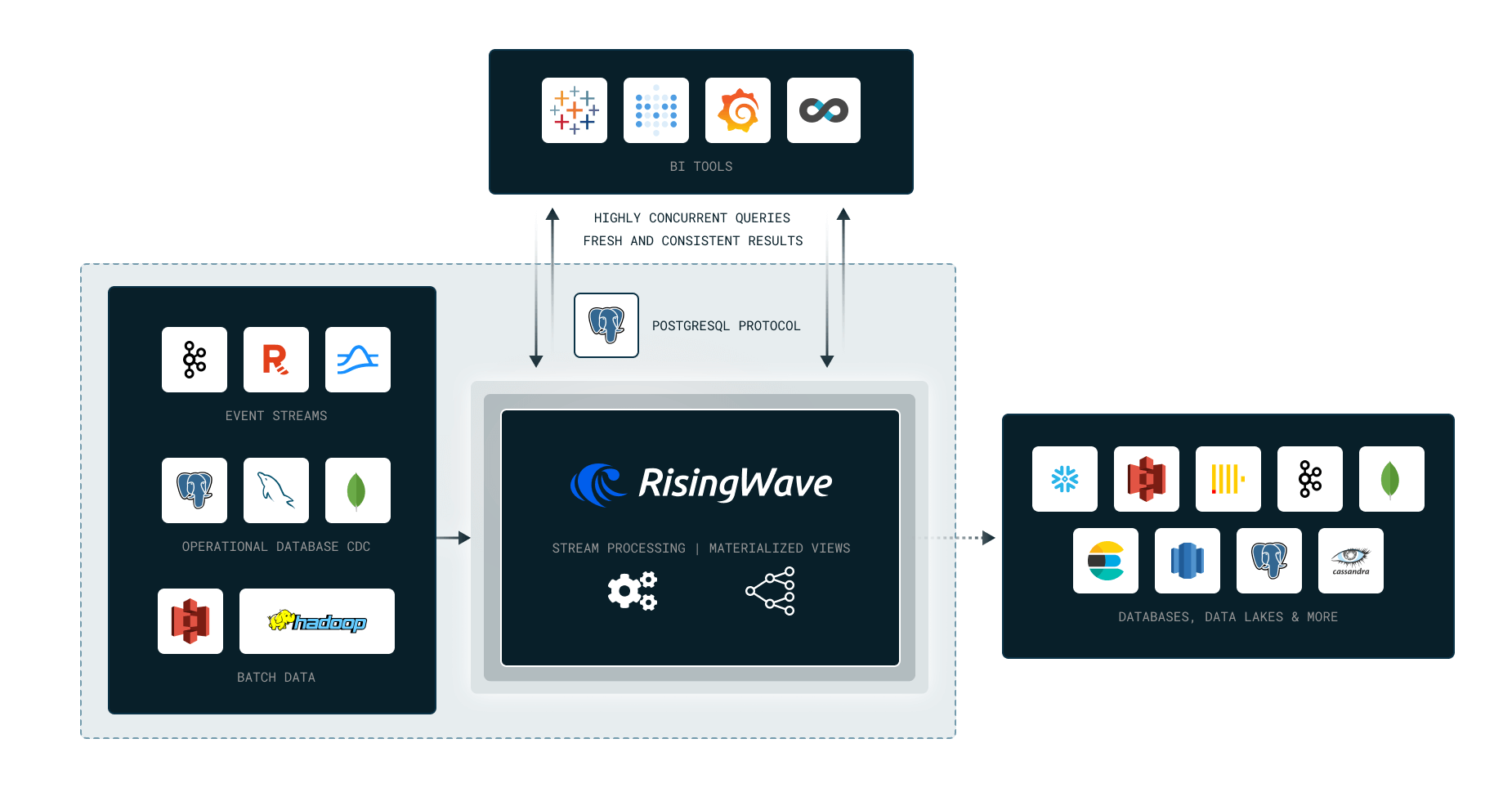
|
||||
|
||||
|
||||
|
||||
We’ll cover the following topics in this Workshop:
|
||||
|
||||
- Why Stream Processing?
|
||||
@@ -65,6 +67,12 @@ We’ll cover the following topics in this Workshop:
|
||||
RisingWave in 10 Minutes:
|
||||
https://tutorials.risingwave.com/docs/intro
|
||||
|
||||
Workshop video:
|
||||
|
||||
<a href="https://youtube.com/live/L2BHFnZ6XjE">
|
||||
<img src="https://markdown-videos-api.jorgenkh.no/youtube/L2BHFnZ6XjE" />
|
||||
</a>
|
||||
|
||||
[Project Repository](https://github.com/risingwavelabs/risingwave-data-talks-workshop-2024-03-04)
|
||||
|
||||
## Homework
|
||||
@@ -76,7 +84,7 @@ https://tutorials.risingwave.com/docs/intro
|
||||
|
||||
_This question is just a warm-up to introduce dynamic filter, please attempt it before viewing its solution._
|
||||
|
||||
What are the pick up taxi zones at the latest dropoff times?
|
||||
What are the dropoff taxi zones at the latest dropoff times?
|
||||
|
||||
For this part, we will use the [dynamic filter pattern](https://docs.risingwave.com/docs/current/sql-pattern-dynamic-filters/).
|
||||
|
||||
@@ -132,34 +140,37 @@ Options:
|
||||
|
||||
### Question 3
|
||||
|
||||
From the latest pickup time to 17 hours before, what are the top 10 busiest zones in terms of number of pickups?
|
||||
From the latest pickup time to 17 hours before, what are the top 3 busiest zones in terms of number of pickups?
|
||||
For example if the latest pickup time is 2020-01-01 12:00:00,
|
||||
then the query should return the top 10 busiest zones from 2020-01-01 11:00:00 to 2020-01-01 12:00:00.
|
||||
then the query should return the top 3 busiest zones from 2020-01-01 11:00:00 to 2020-01-01 12:00:00.
|
||||
|
||||
HINT: You can use [dynamic filter pattern](https://docs.risingwave.com/docs/current/sql-pattern-dynamic-filters/)
|
||||
to create a filter condition based on the latest pickup time.
|
||||
|
||||
NOTE: For this question `17 hours` was picked to ensure we have enough data to work with.
|
||||
|
||||
Fill in the top 10:
|
||||
1. `__________`
|
||||
2. `__________`
|
||||
3. `__________`
|
||||
4. `__________`
|
||||
5. `__________`
|
||||
6. `__________`
|
||||
7. `__________`
|
||||
8. `__________`
|
||||
9. `__________`
|
||||
10. `__________`
|
||||
Options:
|
||||
1. Clinton East, Upper East Side North, Penn Station
|
||||
2. LaGuardia Airport, Lincoln Square East, JFK Airport
|
||||
3. Midtown Center, Upper East Side South, Upper East Side North
|
||||
4. LaGuardia Airport, Midtown Center, Upper East Side North
|
||||
|
||||
|
||||
## Submitting the solutions
|
||||
|
||||
- Form for submitting: TBA
|
||||
- You can submit your homework multiple times. In this case, only the
|
||||
last submission will be used.
|
||||
- Form for submitting: https://courses.datatalks.club/de-zoomcamp-2024/homework/workshop2
|
||||
- Deadline: 11 March (Monday), 23:00 CET
|
||||
|
||||
## Rewards 🥳
|
||||
|
||||
Everyone who completes the homework will get a pen and a sticker, and 5 lucky winners will receive a Tshirt and other secret surprises!
|
||||
We encourage you to share your achievements with this workshop on your socials and look forward to your submissions 😁
|
||||
|
||||
- Follow us on **LinkedIn**: https://www.linkedin.com/company/risingwave
|
||||
- Follow us on **GitHub**: https://github.com/risingwavelabs/risingwave
|
||||
- Join us on **Slack**: https://risingwave-labs.com/slack
|
||||
|
||||
See you around!
|
||||
|
||||
Deadline: TBA
|
||||
|
||||
## Solution
|
||||
|
||||
Reference in New Issue
Block a user